Nobody likes to get this error. It basically means that your mailbox is too full.
Assuming you have the default 50 GB size limit. if you check your ost cache file it will be around 49,800MB. It has a maximum limit of 50 GB but doesn’t get there as it will stop allowing you to send and receive and even modifying calendar items until this is fixed.
There are a few different options
- Delete old email
- Reconfigure your mailbox to not cache any email locally
- You do this by opening mail in control panel

- click Email accounts
- Highlight the email address that is having the problems
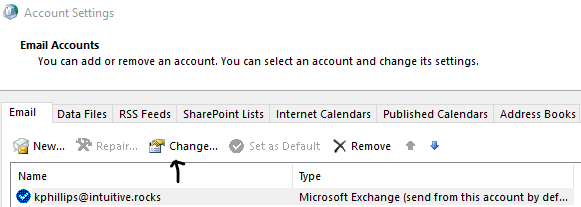
- Click Change
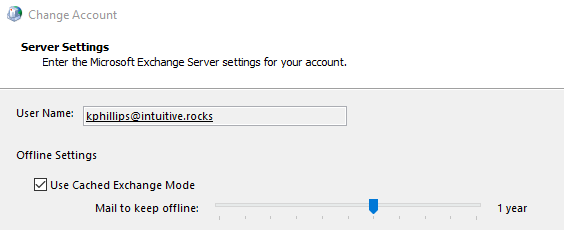
- by default this is set to keep 1 year
- To remove completely, uncheck “Use Cached Exchange Mode”
- You can also slide the marker down to reduce the amount of mail that is cached.
- Note: Your older mail is still accessible, but not offline. It may take longer to retrieve by a second or two.
- You do this by opening mail in control panel
- You can increase your Mailbox size to 100 GB
- changing the O365 Subscription from Professional to E3.
- Implement some registry edits to complete this
- open regedit
- browse to
Computer\HKEY_CURRENT_USER\Software\Microsoft\Office\16.0\Outlook\PST
- Add Dword 32 bit items
-
MaxLargeFileSize decimal 2,075,149,312
-
WarnLargeFileSize decimal 1,950,368,768
- Reboot
 INTUITIVE TECHNOLOGIES