Recently Microsoft has made an application behavioral change in Office with the recent udpates. I believe the offending update is Microsoft Office 365 Apps for Business v16.0.16924.20124.
This update changes the behavior of the app so when you open a files that is on your local PC or on a network share and you modify it and want to save it to the same path but with a different name or as a PDF for example. The path does not come up, but rather your OneDrive.

Now you were wanting to save the document in the same path, but now you’re in OneDrive
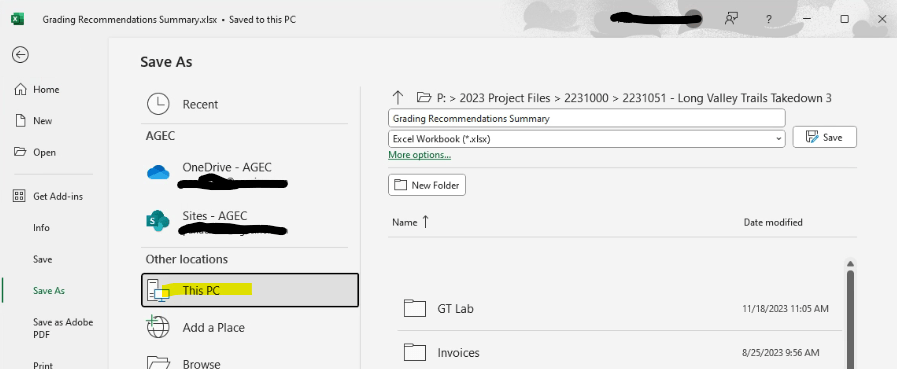
You can get to the path by clicking This PC in the Save As drop down options.
To make this change permanent you need to make a change in the app by going into application and clicking on File, Options. Then select Save to Computer by default.
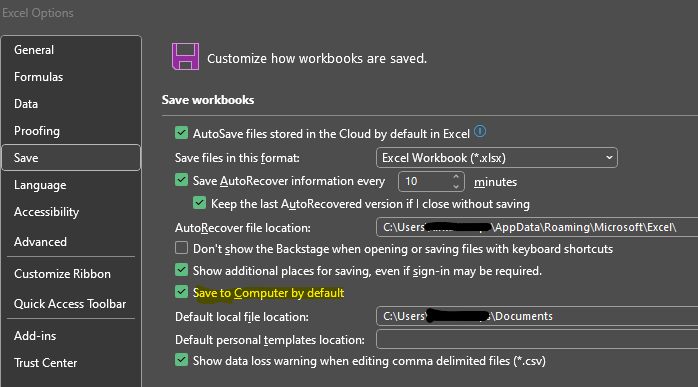
Click OK
You will then notice that when you click Save As when you’re editing a file you opened from a network path that it will default back to that path. without requiring you to click on This PC first.
 INTUITIVE TECHNOLOGIES